
Remove "Mini Toolbar" in MS Word 2007
When the mouse is used to select text, Word displays the Mini Toolbar, looking like this:
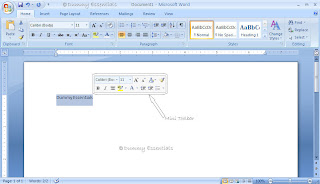 The Mini Toolbar is a palette of common formatting commands that Word supposes you need for
a quick-format on that selected text. You may find the Mini Toolbar more annoying than useful. If so, you can suppress its display. Follow these steps:
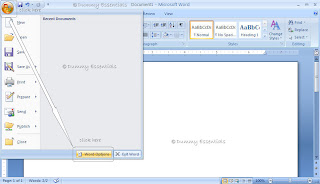
Choose the "Word Options" command from the Office Button menu.
The Mini Toolbar is a palette of common formatting commands that Word supposes you need for
a quick-format on that selected text. You may find the Mini Toolbar more annoying than useful. If so, you can suppress its display. Follow these steps:
Choose the "Word Options" command from the Office Button menu.
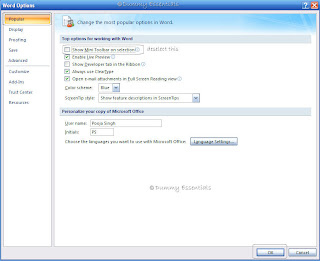
 Choose "Popular" from the list on the left side of the "Word Options" window. Remove the check mark by the item "Show Mini Toolbar on Selection". Click on "OK".
 If you would rather not eternally banish the Mini Toolbar, note that it hides itself whenever you
move the mouse beyond the selected chunk of text.
If you would rather not eternally banish the Mini Toolbar, note that it hides itself whenever you
move the mouse beyond the selected chunk of text.
 The Mini Toolbar is a palette of common formatting commands that Word supposes you need for
a quick-format on that selected text. You may find the Mini Toolbar more annoying than useful. If so, you can suppress its display. Follow these steps:
Choose the "Word Options" command from the Office Button menu.
The Mini Toolbar is a palette of common formatting commands that Word supposes you need for
a quick-format on that selected text. You may find the Mini Toolbar more annoying than useful. If so, you can suppress its display. Follow these steps:
Choose the "Word Options" command from the Office Button menu.
 Choose "Popular" from the list on the left side of the "Word Options" window. Remove the check mark by the item "Show Mini Toolbar on Selection". Click on "OK".
 If you would rather not eternally banish the Mini Toolbar, note that it hides itself whenever you
move the mouse beyond the selected chunk of text.
If you would rather not eternally banish the Mini Toolbar, note that it hides itself whenever you
move the mouse beyond the selected chunk of text.





Listed/Ranked:
The Tech Directory
Cluster Maps