

How To Activate And Enable Facebook Timeline Profile Right Now [Guide]
Today Facebook at F8 developers conference unveiled new features of Facebook that will totally transformed the Facebook. One of the key feature that were discussed at F8 was Timeline. Timeline will totally change the layout of your profile. It won’t be available for a few more weeks, only developers can access the new Timeline profile. We have just posted a detailed guide on how to get Facebook Timeline Feature in just simple steps.
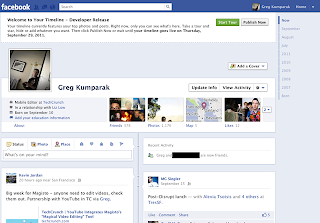 Facebook Timeline is only available for open graph developers and if you are not so you can become easily an open graph developer and can get the Facebook Timeline profile.
Important note:
- You probably don’t want to do this unless you’re actually a developer. Expect bugs.
- Only you will see your timeline at first (unless you decide otherwise), but your timeline will take over your homepage after a few days. My timeline was automatically hard-set to go public on September 29th.
- It seems that if you login into Facebook on another machine, Timeline gets disabled automatically on all of your machines. With that said, it seems you can get back to your timeline (but ONLY after following the steps below) by navigating to http://www.facebook.com/YOURUSERNAMEHERE?sk=timeline
- You’ll need to have a “verified” account for one of the steps, which means you need a credit card or phone number attached to the account.
Here’s how to Activate And Enable Facebook Timeline Right Now:
- Log into Facebook
- Enable developer mode, if you haven’t already. To do this, type “developer” into the search box, click the first result (it should be an app made by Facebook with a few hundred thousand users), and add the app.
- Jump into the developer app (if Facebook doesn’t put you there automatically, it should be in your left-hand tool bar)
- Create a new app (don’t worry — you wont actually be submitting this for anyone else to see/use). Give your shiny new app any display name and namespace you see fit. Read through and agree to the Platform Privacy agreement. This is the step you need to be verified for.
- Ensure you’re in your new app’s main settings screen. You should see your app’s name near the top of the page
- Look for the “Open Graph” header, and click the “Get Started using open graph” link.
- Create a test action for your app, like “read” a “book”, or “eat” a “sandwich”
- This should drop you into an action type configuration page. Change a few of the default settings (I changed the past tense of “read” to “redd” — again, only you can see this unless you try and submit your application to the public directory), and click through all three pages of settings
- Wait 2-3 minutes
- Go back to your Facebook homescreen. An invite to try Timeline should be waiting at the top of the page
Now visit your profile page and Facebook will give you the option to switch to Timeline view
Facebook Timeline is only available for open graph developers and if you are not so you can become easily an open graph developer and can get the Facebook Timeline profile.
Important note:
- You probably don’t want to do this unless you’re actually a developer. Expect bugs.
- Only you will see your timeline at first (unless you decide otherwise), but your timeline will take over your homepage after a few days. My timeline was automatically hard-set to go public on September 29th.
- It seems that if you login into Facebook on another machine, Timeline gets disabled automatically on all of your machines. With that said, it seems you can get back to your timeline (but ONLY after following the steps below) by navigating to http://www.facebook.com/YOURUSERNAMEHERE?sk=timeline
- You’ll need to have a “verified” account for one of the steps, which means you need a credit card or phone number attached to the account.
Here’s how to Activate And Enable Facebook Timeline Right Now:
- Log into Facebook
- Enable developer mode, if you haven’t already. To do this, type “developer” into the search box, click the first result (it should be an app made by Facebook with a few hundred thousand users), and add the app.
- Jump into the developer app (if Facebook doesn’t put you there automatically, it should be in your left-hand tool bar)
- Create a new app (don’t worry — you wont actually be submitting this for anyone else to see/use). Give your shiny new app any display name and namespace you see fit. Read through and agree to the Platform Privacy agreement. This is the step you need to be verified for.
- Ensure you’re in your new app’s main settings screen. You should see your app’s name near the top of the page
- Look for the “Open Graph” header, and click the “Get Started using open graph” link.
- Create a test action for your app, like “read” a “book”, or “eat” a “sandwich”
- This should drop you into an action type configuration page. Change a few of the default settings (I changed the past tense of “read” to “redd” — again, only you can see this unless you try and submit your application to the public directory), and click through all three pages of settings
- Wait 2-3 minutes
- Go back to your Facebook homescreen. An invite to try Timeline should be waiting at the top of the page
Now visit your profile page and Facebook will give you the option to switch to Timeline view
 Facebook Timeline is only available for open graph developers and if you are not so you can become easily an open graph developer and can get the Facebook Timeline profile.
Important note:
- You probably don’t want to do this unless you’re actually a developer. Expect bugs.
- Only you will see your timeline at first (unless you decide otherwise), but your timeline will take over your homepage after a few days. My timeline was automatically hard-set to go public on September 29th.
- It seems that if you login into Facebook on another machine, Timeline gets disabled automatically on all of your machines. With that said, it seems you can get back to your timeline (but ONLY after following the steps below) by navigating to http://www.facebook.com/YOURUSERNAMEHERE?sk=timeline
- You’ll need to have a “verified” account for one of the steps, which means you need a credit card or phone number attached to the account.
Here’s how to Activate And Enable Facebook Timeline Right Now:
- Log into Facebook
- Enable developer mode, if you haven’t already. To do this, type “developer” into the search box, click the first result (it should be an app made by Facebook with a few hundred thousand users), and add the app.
- Jump into the developer app (if Facebook doesn’t put you there automatically, it should be in your left-hand tool bar)
- Create a new app (don’t worry — you wont actually be submitting this for anyone else to see/use). Give your shiny new app any display name and namespace you see fit. Read through and agree to the Platform Privacy agreement. This is the step you need to be verified for.
- Ensure you’re in your new app’s main settings screen. You should see your app’s name near the top of the page
- Look for the “Open Graph” header, and click the “Get Started using open graph” link.
- Create a test action for your app, like “read” a “book”, or “eat” a “sandwich”
- This should drop you into an action type configuration page. Change a few of the default settings (I changed the past tense of “read” to “redd” — again, only you can see this unless you try and submit your application to the public directory), and click through all three pages of settings
- Wait 2-3 minutes
- Go back to your Facebook homescreen. An invite to try Timeline should be waiting at the top of the page
Now visit your profile page and Facebook will give you the option to switch to Timeline view
Facebook Timeline is only available for open graph developers and if you are not so you can become easily an open graph developer and can get the Facebook Timeline profile.
Important note:
- You probably don’t want to do this unless you’re actually a developer. Expect bugs.
- Only you will see your timeline at first (unless you decide otherwise), but your timeline will take over your homepage after a few days. My timeline was automatically hard-set to go public on September 29th.
- It seems that if you login into Facebook on another machine, Timeline gets disabled automatically on all of your machines. With that said, it seems you can get back to your timeline (but ONLY after following the steps below) by navigating to http://www.facebook.com/YOURUSERNAMEHERE?sk=timeline
- You’ll need to have a “verified” account for one of the steps, which means you need a credit card or phone number attached to the account.
Here’s how to Activate And Enable Facebook Timeline Right Now:
- Log into Facebook
- Enable developer mode, if you haven’t already. To do this, type “developer” into the search box, click the first result (it should be an app made by Facebook with a few hundred thousand users), and add the app.
- Jump into the developer app (if Facebook doesn’t put you there automatically, it should be in your left-hand tool bar)
- Create a new app (don’t worry — you wont actually be submitting this for anyone else to see/use). Give your shiny new app any display name and namespace you see fit. Read through and agree to the Platform Privacy agreement. This is the step you need to be verified for.
- Ensure you’re in your new app’s main settings screen. You should see your app’s name near the top of the page
- Look for the “Open Graph” header, and click the “Get Started using open graph” link.
- Create a test action for your app, like “read” a “book”, or “eat” a “sandwich”
- This should drop you into an action type configuration page. Change a few of the default settings (I changed the past tense of “read” to “redd” — again, only you can see this unless you try and submit your application to the public directory), and click through all three pages of settings
- Wait 2-3 minutes
- Go back to your Facebook homescreen. An invite to try Timeline should be waiting at the top of the page
Now visit your profile page and Facebook will give you the option to switch to Timeline view
What is Google GMMXLE ?
 Wondering what MMXL on Google Homepage is? This came up on 1-1-11. This is Google's way of wishing us a Happy New Year and their claim to be the best in 2011.
Wonder how? Here is the explanation.
Roman format
M - 1000
X - 10
I - 1
and if you look at the logo carefully you could see the message is GMMXIe and not GMMXLe , so the fifth character is I and not L.
So MMXI indicates 1000+1000+10+1 i.e 2011.
MMXI - 2011
Well, Google might have thought in a different way also, enclosing 2011 in G and e, they symbolically indicates they are going to rule the internet in 2011.
Wondering what MMXL on Google Homepage is? This came up on 1-1-11. This is Google's way of wishing us a Happy New Year and their claim to be the best in 2011.
Wonder how? Here is the explanation.
Roman format
M - 1000
X - 10
I - 1
and if you look at the logo carefully you could see the message is GMMXIe and not GMMXLe , so the fifth character is I and not L.
So MMXI indicates 1000+1000+10+1 i.e 2011.
MMXI - 2011
Well, Google might have thought in a different way also, enclosing 2011 in G and e, they symbolically indicates they are going to rule the internet in 2011.
Happy New Year 2010!

Finally another year comes to end and its time for the new year to dawn, bringing with it new aspirations, new resolutions and new hope..
May the New Year bring you happiness, joy, good health, prosperity and a lot of luck. Wish you a very happy and successful 2010.
Looking out for some new year desktop wallpapers or cards? Here are a few of those..
Dummy Essentials New Year 2010 Wallpapers:





Listed/Ranked:
The Tech Directory
Cluster Maps