

Shortcut to Lock Your Computer
There may be situations when you hardly have time to go through the standard way of locking your computer (Pressing Ctrl+Alt+Del) but still prefer locking with one click rather than logging off. A good idea would be to create a shortcut for it on your desktop, so that you can lock it with just a click the next time and here we tell you how exactly to go about creating one.
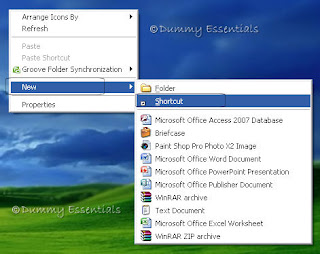
To start, right click on an empty part of the desktop, select "New" followed by choosing "Shortcut"
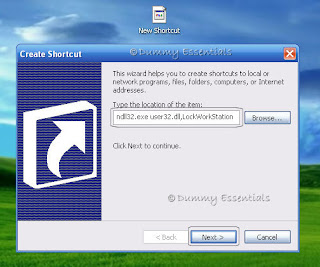
 In the "Create Shortcut" popup box that opens, within "Type the location of the item" text box,
 In the "Create Shortcut" popup box that opens, within "Type the location of the item" text box,
type this: rundll32.exe user32.dll,LockWorkStation
and click on "Next"
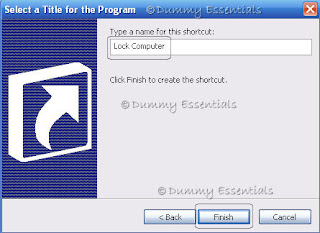
 The next window is "Select a Title for the Program" where you can type a name for this shortcut. I typed in "Lock Computer" and click on "Finish"
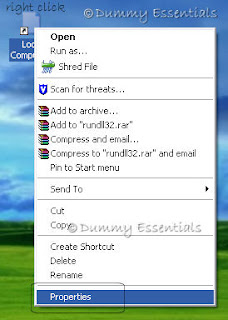
 Now that the shortcut is ready on the desktop, how about assigning an appropriate icon to it? Start by right clicking on the shortcut (Lock Computer) and select "Properties"
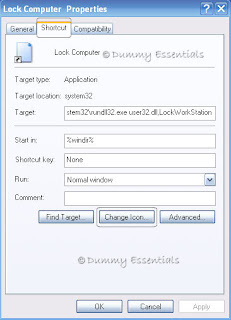
 In the "Lock Computer Properties" window, within the "Shortcut" tab, select the "Change Icon" button.
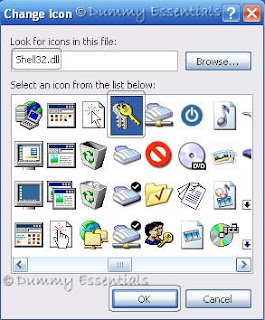
 In the "Change Icon" window, inside "Look for icons in this file" text box, type in: Shell32.dll and click "OK". Select from a wide list of icons there and once decided, click on it and then "OK".
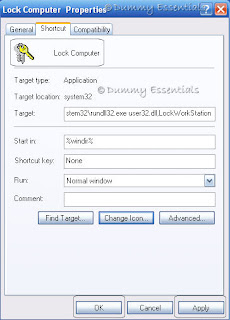
 In the "Lock Computer Properties" window open in the background click on "Apply" and then "OK" for the changes to take place.
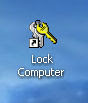
 Once all the windows are closed, your shortcut to lock your computer is ready on the desktop.
 The next window is "Select a Title for the Program" where you can type a name for this shortcut. I typed in "Lock Computer" and click on "Finish"
 Now that the shortcut is ready on the desktop, how about assigning an appropriate icon to it? Start by right clicking on the shortcut (Lock Computer) and select "Properties"
 In the "Lock Computer Properties" window, within the "Shortcut" tab, select the "Change Icon" button.
 In the "Change Icon" window, inside "Look for icons in this file" text box, type in: Shell32.dll and click "OK". Select from a wide list of icons there and once decided, click on it and then "OK".
 In the "Lock Computer Properties" window open in the background click on "Apply" and then "OK" for the changes to take place.
 Once all the windows are closed, your shortcut to lock your computer is ready on the desktop.


Listed/Ranked:
The Tech Directory
Cluster Maps